What Is Form 8821 and How Does It Unlock Your IRS Records
Discover what is Form 8821, a Tax Information Authorization that grants secure, view-only access to your IRS records without giving up control.
In this article
- Unlocking Your Tax History with Form 8821
- The Core Purpose: Information Without Representation
- Form 8821 at a Glance: Key Features
- When and Why You Should Use Form 8821
- Common Scenarios for Individuals
- Essential Uses for Businesses
- Form 8821 vs. Form 2848: Understanding the Critical Differences
- The Power to Act vs. The Power to See
- Form 8821 (Authorization) vs Form 2848 (Power of Attorney)
- Choosing the Right Form For Your Situation
- How to Correctly Fill Out and File Form 8821
- A Line-by-Line Walkthrough
- Avoiding Common Pitfalls
- How to Submit Your Form
- Managing, Revoking, and Expiring Your Form 8821 Authorization
- How to Revoke an Active Form 8821
- Understanding Automatic Expiration
- Frequently Asked Questions About Form 8821
- Can I List More Than One Person on a Single Form 8821?
- How Long Does It Take for the IRS to Process Form 8821?
- Does Form 8821 Allow My Representative to Talk to the IRS for Me?
- Will Filing a New Form 8821 Automatically Revoke an Old One?
When you need to give someone a peek into your IRS files, Form 8821, Tax Information Authorization, is the tool for the job. Think of it as handing over a "read-only" key to your tax records. The person you designate can look at your information, but they can't change anything or speak for you.
Unlocking Your Tax History with Form 8821

Dealing with the IRS can often feel like you're trying to solve a complex puzzle with half the pieces missing. Maybe you’ve received a cryptic notice, or you're trying to get a mortgage and the lender needs to verify your income. This is exactly when Form 8821 proves its worth.
It’s your official permission slip, telling the IRS that it's okay to open up your confidential tax files to a specific person or firm you trust.
This form is powerful because of its focused simplicity. Once you file it, you're empowering a professional to get the information they need to help you.
- Diagnose Problems: A tax pro can pull your complete account transcripts to figure out exactly why you have a tax debt or why the IRS assessed a penalty.
- Verify Financials: Lenders and financial advisors can get direct confirmation of your income history, which can speed up loan applications significantly.
- Plan Strategically: A good accountant can review your past tax filings to spot patterns and find opportunities for you to save money in the future.
The Core Purpose: Information Without Representation
The single most important thing to understand about Form 8821 is that it separates access from action. Your designated person can look, but they can't touch.
This means they have no power to negotiate a settlement with the IRS, sign any agreements on your behalf, or represent you in an audit. That "read-only" status is a critical safeguard. It ensures you—and only you—remain in the driver's seat when it comes to making decisions about your taxes.
Form 8821 is almost always the first step in solving a tax problem. It allows a professional to do a deep-dive analysis of your IRS records, giving you a crystal-clear picture of your situation before you commit to a particular strategy or plan.
This makes it the perfect low-risk diagnostic tool. It lets you get an expert opinion based on real data. So when you receive one of those dreaded IRS letters and notices, authorizing a professional with Form 8821 is the smartest, safest way to find out what's really going on.
To get a quick overview of what this form does (and doesn't do), take a look at the table below.
Form 8821 at a Glance: Key Features
| Feature | Description |
|---|---|
| Authorization Type | Grants permission to inspect confidential tax information only. |
| Who Can Be Appointed? | Anyone the taxpayer designates (e.g., CPA, attorney, financial advisor, family member). |
| Representation Rights | None. The designee cannot represent the taxpayer before the IRS. |
| Communication | The designee can receive and inspect the taxpayer's confidential tax information. |
| Typical Use Cases | Income verification for loans, initial tax problem diagnosis, financial planning. |
| Primary Limitation | Does not grant power of attorney; the designee cannot advocate or negotiate. |
In short, Form 8821 is all about giving a trusted advisor the background information they need to give you the best possible advice.
When and Why You Should Use Form 8821
Knowing what Form 8821 is helps, but understanding when to use it is where the rubber really meets the road. This form is a surprisingly versatile tool for all sorts of situations, both personal and professional. Think of it as the perfect first step for getting a clear picture of a tax situation without handing over the keys to the kingdom.
It’s like getting a second opinion or running a diagnostic test. You wouldn't let a mechanic start replacing parts without first figuring out what's wrong with the engine, right? Form 8821 lets a trusted professional look under the hood of your IRS account before anyone decides on a course of action.
Common Scenarios for Individuals
For most people, Form 8821 is the key to untangling financial knots during major life events. It's incredibly practical and can be a strategic move when you need to provide or verify tax information quickly and officially.
Here are a few classic examples:
- Applying for a Mortgage: Lenders need to see cold, hard proof of your income. Filing a Form 8821 lets your mortgage broker pull your official tax transcripts directly from the IRS. This can seriously speed up the underwriting process because it provides the exact documentation they need to verify your financial history.
- Navigating a Divorce: When a marriage ends, financial transparency is non-negotiable. A family law attorney can use Form 8821 to access a spouse's tax records, making sure all income and assets are on the table for a fair settlement.
- Assessing Bankruptcy Options: If you're exploring bankruptcy, your attorney must have a complete picture of your tax situation. This form gives them the access they need to see exactly what you owe the IRS and determine if that debt can be discharged.
Essential Uses for Businesses
Business owners, particularly those with more complex finances, will find Form 8821 to be an absolute lifesaver. It allows your advisors to get ahead of problems and manage tax obligations proactively. You might use Form 8821 when you engage professional tax and business services to help manage your financial obligations and potentially reduce your tax burden.
Key Takeaway: Form 8821 is your tool for granting secure, view-only access. It empowers professionals to diagnose problems with precision, whether for a home loan, a business audit, or legal matters, all while you keep full control.
This authorization is especially critical when dealing with specific business challenges. Let's say your company has fallen behind on payroll taxes—a common but serious issue. A tax professional can use Form 8821 to pull your entire account history.
They can pinpoint the exact periods you missed, see how penalties and interest have been calculated, and gather all the facts needed to lay out your options, like figuring out how to set up a payment plan with the IRS.
Ultimately, Form 8821 is the safest way to get an expert opinion. It gives a professional the information they need to give you sound advice, making it the ideal starting point for nearly any tax-related issue.
Form 8821 vs. Form 2848: Understanding the Critical Differences
One of the most common points of confusion for taxpayers is the line between Form 8821 and Form 2848. At first glance, they seem similar, but their functions are worlds apart. Knowing which one to use is essential for giving your tax professional the right tool for the job.
Think of it this way: Form 8821 is like giving someone a read-only key to your financial records. You're hiring a consultant to run diagnostics, look at the books, and give you a detailed report on what they find. They can see everything, but they can't change anything or make decisions for you.
On the other hand, Form 2848 is like handing over the keys to the business and hiring a CEO. This person can speak on your behalf, negotiate deals, and legally bind you to agreements. It’s a true grant of power, not just a grant of access.
The Power to Act vs. The Power to See
The heart of the difference comes down to one word: representation. A Form 8821 grants the power to see your confidential tax information. A professional with this authorization can pull your tax transcripts, receive copies of IRS notices, and get a complete picture of your account history.
But that’s where their power ends. They absolutely cannot:
- Speak to an IRS agent on your behalf to resolve an issue.
- Negotiate things like penalty abatement or a payment plan.
- Sign a tax return or any binding agreement for you.
- Represent you in an audit, hearing, or appeal.
For any of those actions, your professional needs a Form 2848, Power of Attorney and Declaration of Representative. As the name suggests, this form gives them the legal authority to step into your shoes and act as your representative before the IRS. You can learn more about its specific powers in our guide to Form 2848 instructions.
The flowchart below walks through some common scenarios to help you decide if a Form 8821 is the right fit.
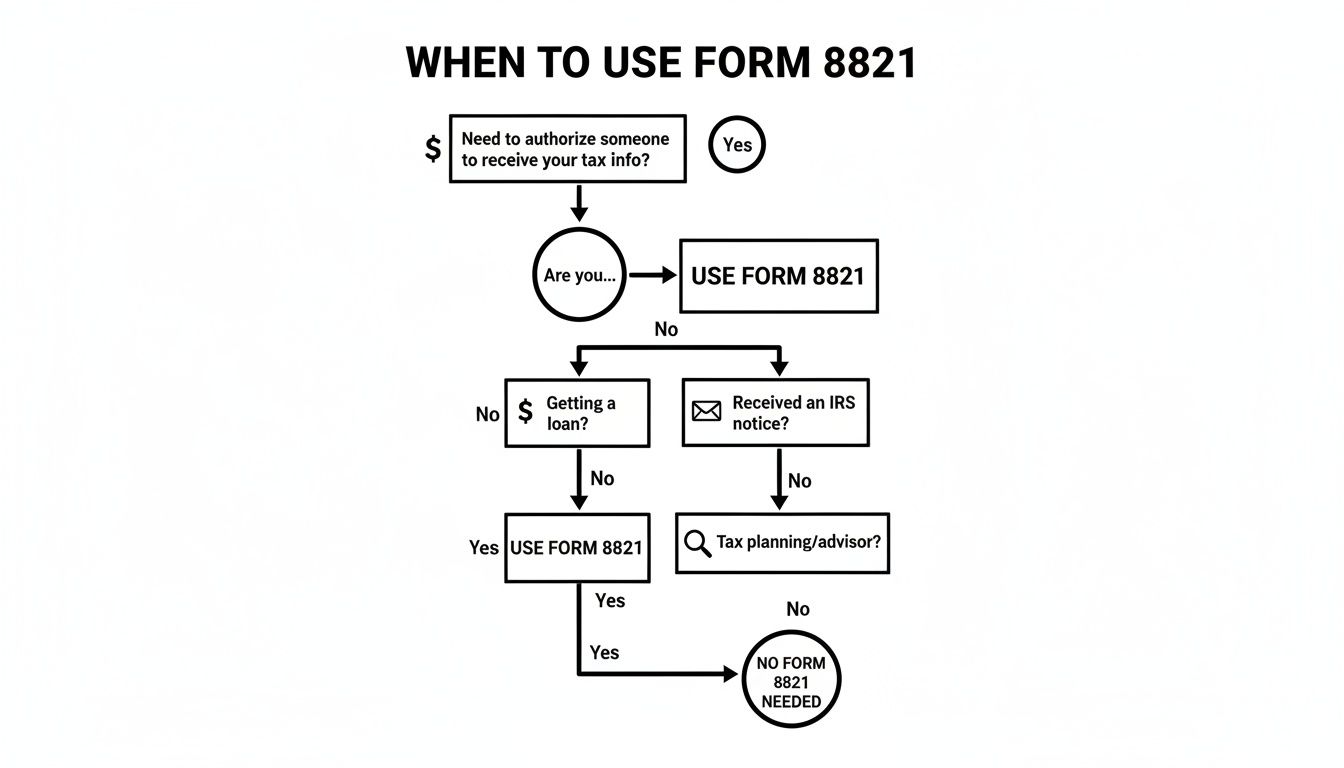
As the chart shows, Form 8821 is perfect for information-gathering tasks, such as preparing for a loan application, figuring out what an IRS notice means, or proactive tax planning.
To make the distinction crystal clear, here’s a direct comparison of the two forms.
Form 8821 (Authorization) vs Form 2848 (Power of Attorney)
| Attribute | Form 8821 Tax Information Authorization | Form 2848 Power of Attorney |
|---|---|---|
| Primary Purpose | To inspect and/or receive confidential tax information. | To appoint a representative to act on your behalf before the IRS. |
| Key Power | Access: Can pull transcripts and receive copies of notices. | Representation: Can speak to the IRS, negotiate, and sign agreements. |
| Who Can Be Appointed | Any individual or organization. No special credentials required. | Only specific professionals (Attorney, CPA, Enrolled Agent, etc.). |
| Common Use Case | A mortgage lender verifying income; a CPA reviewing your account. | An attorney negotiating a settlement; an EA representing you in an audit. |
| Can They Argue a Case? | No. They cannot advocate, negotiate, or resolve issues. | Yes. This is its primary function. |
| Can They Sign Returns? | No. | No, but they can sign other agreements, like a closing agreement. |
In short, Form 8821 is for looking, and Form 2848 is for acting.
Choosing the Right Form For Your Situation
So, how do you decide which one you need? It all comes down to strategy. If you're just beginning to investigate a tax problem or simply need to provide income verification for a loan, Form 8821 is the perfect, low-risk starting point. It lets an expert properly diagnose the situation without you handing over significant legal authority.
You would only graduate to a Form 2848 once you've settled on a course of action that requires direct negotiation with the IRS. For instance, after your CPA uses a Form 8821 to analyze your account, they might recommend an Offer in Compromise. To actually file and negotiate that offer, they would then need you to file a Form 2848.
Crucial Insight: Starting with Form 8821 keeps you in the driver's seat. It allows you to get an expert opinion based on official IRS records before you decide whether to grant the much deeper powers of a Form 2848.
How to Correctly Fill Out and File Form 8821

Getting Form 8821 right is all about precision. It might only be a single page, but one tiny mistake—like an old address, a vague date range, or a missing signature—is enough for the IRS to reject it, leaving you stuck with frustrating delays.
Let's walk through how to fill out this form correctly the first time. Think of it less like a tax form and more like a set of very specific instructions you're giving the IRS. The clearer your instructions, the better.
A Line-by-Line Walkthrough
Nailing the details on this form is what unlocks the information your tax pro needs to help you. Here’s a breakdown of the most important lines.
Line 1: Taxpayer Information: This is where you put your full name, current address, and your Taxpayer Identification Number (TIN)—that's your Social Security Number (SSN) or Employer Identification Number (EIN). This information has to exactly match what the IRS has on file for you. Mismatches here are probably the number one reason these forms get rejected.
Line 2: Designee Information: Here, you'll list the person or firm you're giving access to. You'll need their full name and address. If they have a Centralized Authorization File (CAF) number, use it. Most tax professionals do, and including it helps the IRS process the form much, much faster.
Line 3: Tax Matters: Pay close attention here—this is the heart of the form. You have to tell the IRS exactly what information your designee can see.
- (a) Type of Tax Information: Be specific. Is it "Income," "Employment," or a "Civil Penalty"? Write it in.
- (b) Tax Form Number: Name the specific form, like "1040" for your personal taxes or "941" if it's about quarterly payroll.
- (c) Year(s) or Period(s): Don't be vague. The IRS needs exact periods. Use specific years (e.g., "2021, 2022") or quarters ("3rd Quarter 2023"). A critical mistake is writing something like "All years"—that's an instant rejection.
This specificity is everything. For the 14 million U.S. taxpayers dealing with IRS debts, a properly filed Form 8821 is often the first step toward resolution. It lets a professional pull the exact IRS account transcripts needed to see balances, penalties, and notices—the raw data required for strategies like an Offer in Compromise. Find out more about how Form 8821 aids tax resolution on sempertax.com.
Avoiding Common Pitfalls
It’s easy to stumble on simple mistakes that get your form kicked back. Keep an eye out for these classic blunders:
- Forgetting to Sign: It sounds obvious, but it happens all the time. An unsigned form is worthless. Make sure you sign and date Line 6.
- Vague Tax Periods: I can't stress this enough. Avoid generalities like "all" or "various." The IRS system needs concrete dates and years to work with.
- Incorrect Address or TIN: Always double-check that the information on Line 1 perfectly matches what's on your most recently filed tax return.
Pro Tip: Before you send it off, make a photocopy of the completed and signed Form 8821 for your own records. You'll be glad you have it if you ever need to reference or revoke the authorization down the road. Once the form is filed, having a good system for streamlining client document management is the next logical step for professionals to keep everything organized and accessible.
How to Submit Your Form
Once you've filled it out, signed it, and given it a final once-over, you have a few ways to get it to the IRS. You can find the right mailing address or fax number for your state right in the official instructions on the IRS website.
But if you want the fastest turnaround, use the IRS's "Submit Forms 2848 and 8821 Online" tool. Submitting it digitally gets you a confirmation receipt and usually gets the authorization logged into the CAF system much quicker than sending it by mail or fax.
Managing, Revoking, and Expiring Your Form 8821 Authorization
Think of a Form 8821 as giving a trusted professional a key to your tax records. It's a useful tool, but you're always the one in charge. You can change the locks whenever you need to, and knowing how to manage that access is just as important as granting it in the first place.
This kind of authorization isn't meant to be permanent. Things change—you might hire a new CPA, the tax issue you were dealing with gets resolved, or that loan you applied for is finally approved. Once the original need is gone, it's just good housekeeping to revoke the authorization and protect your information.
How to Revoke an Active Form 8821
Revoking a Tax Information Authorization is surprisingly simple. You don't need a complicated reason or a lawyer to do it; you just have to tell the IRS clearly that you're canceling the access.
Here’s the process, step-by-step:
- Find Your Copy: Grab a copy of the original Form 8821 you wish to cancel.
- Mark it Clearly: Write "REVOKE" in big, clear letters across the top of the first page. Don't be subtle about it.
- Sign and Date It: Below your "REVOKE" note, add your signature and the current date. This makes it official.
- Send it to the IRS: Mail or fax this revoked copy to the same IRS location where you sent the original form.
It’s also a good idea to send a copy to the professional you’re revoking. It’s a professional courtesy that ensures everyone is on the same page and they know their access has ended. This simple act keeps your sensitive data locked down and accessible only to your current team.
Key Point: You don't need to file a brand new form to cancel an old one. A copy of the original, clearly marked "REVOKE" and signed, is all the IRS needs to update its Centralized Authorization File (CAF).
Understanding Automatic Expiration
If you don't actively revoke the form, it won't necessarily last forever, but it can stick around for a while. When you file a Form 8821, the IRS logs it in their CAF system, and it generally stays active until you either revoke it or it's replaced by a newer form.
However, you can also be proactive and set an expiration date right on the form when you first file it. This is a smart move if you know the access is needed for a specific, short-term project, like helping a mortgage lender verify your income.
By setting an end date from the start, you ensure the authorization simply dissolves on its own when the time comes. No further action is needed on your part, giving you built-in control over who sees your tax information and for how long.
Frequently Asked Questions About Form 8821
Even after you get the basics down, a lot of practical questions pop up when it's time to actually use Form 8821. I get these all the time. This section is here to tackle those common "what if" scenarios and clear up any confusion about the form's specific rules, how long it takes to process, and how it plays with other authorizations you might have in place.
Getting these details right is key. It makes the difference between a smooth, quick process and a frustrating delay.
Can I List More Than One Person on a Single Form 8821?
You sure can. The form itself gives you space to name up to two people, or "designees," on one submission. This is handy if you want both your main accountant and maybe their paralegal to have access to your tax records. You just fill out the information for each person in the sections provided.
But what if you need to authorize a third person? The solution is simple: you just file a second Form 8821 for the additional person.
In fact, a lot of savvy taxpayers and businesses file separate forms even when they only have two designees. It gives you more control. You might file one form for the CPA who handles your annual returns and a completely separate one for a tax attorney helping with a specific IRS notice. This makes it much easier to manage or revoke one person's access without messing with the other's.
Key Insight: While you can list two designees per form, filing separate forms for different professionals (e.g., one for your CPA, another for your attorney) provides greater flexibility and makes it simpler to revoke access for one individual without disrupting the other's authorization.
How Long Does It Take for the IRS to Process Form 8821?
This is the million-dollar question, and unfortunately, the answer is "it depends." If you mail or fax your Form 8821, it can take anywhere from a few days to several weeks for the IRS to get it logged into their Centralized Authorization File (CAF) system. How long it takes really comes down to the IRS's current backlog.
But here's the good news. Once that authorization hits the CAF system, things can move incredibly fast. A designated tax pro with an IRS e-Services account can often get immediate online access to your tax transcripts.
Instead of waiting around for paper copies to arrive, your representative can pull your entire tax history digitally, sometimes within hours of the form being processed. This is exactly why tax pros rely so heavily on this form—it lets us get to work right away without the old-school delays. For a deeper dive into topics like this, check out our comprehensive tax FAQ page.
Does Form 8821 Allow My Representative to Talk to the IRS for Me?
No, and this is the single most important thing to remember about Form 8821. This form only gives your designee the right to look at and receive your confidential tax information. It’s strictly a "view-only" pass.
This means your representative can:
- Call the IRS Practitioner Priority Service to get transcripts.
- Receive copies of any tax notices the IRS sends you.
- View your account information online through their professional portal.
What they cannot do is represent you. They have no authority to negotiate with the IRS for you, argue your case with an agent, sign any agreements, or step in on your behalf during an audit. For any of that, you need to file a Form 2848, Power of Attorney.
Think of Form 8821 as giving someone a library card to your IRS records. Form 2848 is what gives them a license to speak for you.
Will Filing a New Form 8821 Automatically Revoke an Old One?
It depends on how you fill out the new form. A new Form 8821 will not automatically cancel a previous one unless you tell the IRS to do so by checking the box on Line 5.
If you leave that box blank, both the old and the new authorizations will stay active. If you check the box on Line 5, the new form will wipe out all previous Form 8821s on file for the exact same tax matters. It's important to know that filing a Form 8821—even one that revokes older 8821s—will never, ever touch a Form 2848 Power of Attorney. The two forms operate on completely separate tracks.
At Attorney Stephen A Weisberg, we know that dealing with IRS forms and procedures can feel overwhelming. That’s why we start with a FREE Tax Debt Analysis to give you a clear picture of your situation and explain your options before you commit to anything. If you're facing tax debt or have questions about your IRS status, contact us for expert guidance at https://weisberg.tax.