IRS Form 8821 Instructions: A Complete Guide (2026)
Your complete guide to IRS Form 8821 instructions. Learn to fill it out line-by-line, avoid common mistakes, and know when you need professional help.

In this article
- Why You Need to Grant Access to Your IRS Records
- What this form solves
- Why clients delay this step
- Form 8821 vs Form 2848 Deciding What You Need
- The practical difference
- Form 8821 vs Form 2848 at a glance
- When both forms make sense
- What works and what does not
- A Line-by-Line Guide to Completing Form 8821
- Line 1 taxpayer information
- Line 2 designee information
- Line 3 tax information
- Line 4 specific use
- Line 5 revocation or retention of prior authorizations
- Signature and submission
- A practical checklist before sending it
- Common Mistakes on Form 8821 and How to Avoid Them
- The obvious mistakes
- The strategic mistake often overlooked
- Why this matters in real life
- What works better
- Other mistakes that cost time
- Filing Revoking and Managing Your Authorization
- How the form is filed
- How revocation works
- What to keep track of
- A simple management habit
- When an 8821 Isnt Enough Get Professional Help
- Signs you need more than information access
- The practical decision
You hired a CPA to clean up old returns. Or your divorce attorney needs to confirm whether an IRS balance is real before a settlement moves forward. Or your payroll provider says a federal tax issue is blocking the next step, but nobody can tell you precisely what the IRS has on file.
That is where IRS Form 8821 becomes useful.
It is not a negotiation form. It is not a power of attorney. It is the form that lets a trusted third party inspect and receive your IRS tax information for the matters and periods you authorize. If you are searching for irs form 8821 instructions, the practical question is usually not “what box do I check?” It is “how do I let the right person see the right records without creating a bigger problem?”
Why You Need to Grant Access to Your IRS Records
A tax problem usually starts with missing facts.
A self-employed taxpayer may not know which years were filed, which balances were assessed, or whether the IRS posted payments correctly. A business owner with payroll issues may need someone to review Forms 941 or 940 records before deciding what to do next. A bankruptcy lawyer or family law lawyer may need tax account details before a case can move.

Form 8821, officially titled Tax Information Authorization, has been part of the IRS’s modern standardized process since before 1982, with official instructions traceable to at least February 1982. It lets a taxpayer authorize a professional to inspect and receive specific IRS records, including transcripts, account balances, and lien information for designated tax types, forms, and years, as reflected in the IRS historical Form 8821 instructions.
What this form solves
The form gives a designee visibility into the IRS file without giving that person authority to act for you.
That distinction matters when:
- A CPA needs transcripts: The accountant can verify filing history and balances before preparing missing returns.
- A payroll company needs account access: The company can monitor compliance issues tied to employment tax forms.
- A lawyer needs tax records for a non-tax case: Family law, bankruptcy, and lending matters often stall when no one can confirm what the IRS record shows.
- A taxpayer wants a second opinion: Limited access lets a professional review the file before anyone steps into full representation.
A tax strategy built without transcripts is guesswork. Form 8821 is often the cleanest first step because it lets the professional see what the IRS sees.
Why clients delay this step
Many people hesitate because they think any IRS authorization gives away too much control.
Form 8821 does not. It is narrower than that. It is often the right document when you want facts first, especially before deciding whether a dispute, collection issue, or contact from an IRS revenue officer requires a stronger response.
Form 8821 vs Form 2848 Deciding What You Need
Most mistakes happen before the form is ever signed.
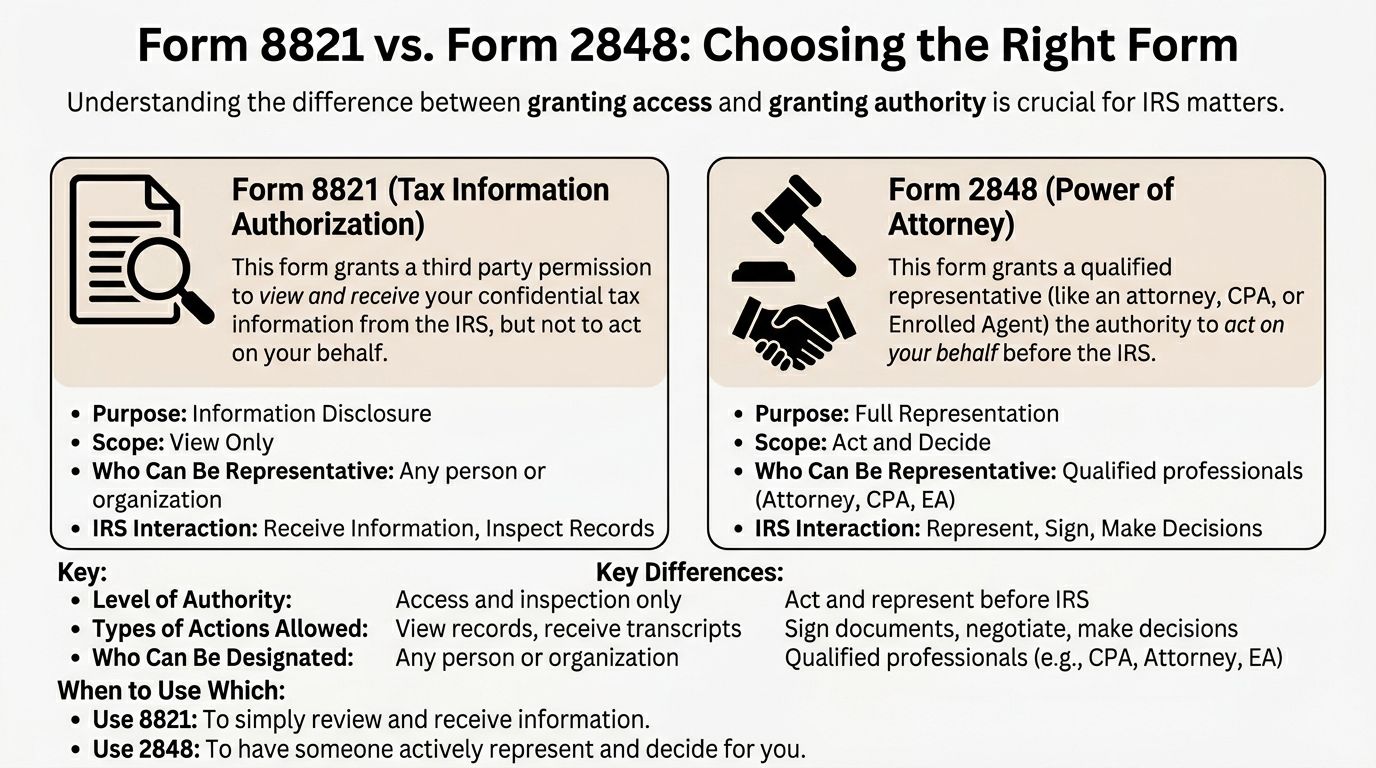
People hear “authorization” and assume any IRS form will let their tax professional handle everything. It will not. Form 8821 is for information access. Form 2848 is for representation. If you pick the wrong one, the matter slows down immediately.
The practical difference
A good shorthand is this:
- Form 8821: “You may see my IRS records.”
- Form 2848: “You may deal with the IRS for me within the scope I listed.”
That means Form 8821 is useful when someone needs transcripts, balances, filing history, or notice copies. Form 2848 is what you use when someone must advocate, negotiate, appeal, or otherwise represent you before the IRS.
Form 8821 vs Form 2848 at a glance
| Capability | Form 8821 (Tax Info Authorization) | Form 2848 (Power of Attorney) |
|---|---|---|
| Core purpose | Inspect and receive tax information | Represent taxpayer before the IRS |
| Level of authority | View only | Act within authorized scope |
| IRS contact role | Information access | Advocacy and communication |
| Common use | Transcript review, account analysis, verification | Audit defense, collection defense, negotiation |
| Who may be designated | Broadly allows a designee to receive information | Generally used for qualified representatives |
For a fuller discussion of representation authority, see these Form 2848 instructions.
When both forms make sense
This is the part many basic guides skip.
A taxpayer may need both forms active at the same time. One person may need authority to negotiate. Another team member may only need access to records. In a business payroll case, for example, the lead attorney may hold the Form 2848 while an accountant or staff member uses Form 8821 to retrieve and organize records.
A cited gap analysis on this issue notes that the IRS’s Centralized Authorization File (CAF) can coordinate multiple authorizations so a lead representative has Form 2848 authority while others hold Form 8821 viewing access, particularly in more complex matters such as payroll tax debt involving S corporations, as discussed in this analysis of dual-use 8821 and 2848 workflows.
What works and what does not
What works:
- Filing 8821 when the immediate need is records, not advocacy
- Filing 2848 when the IRS must talk to your representative about strategy or resolution
- Using both when the team needs split roles
What does not:
- Signing only Form 8821 and assuming your representative can negotiate
- Giving a lender-style or one-off access form to someone who really needs ongoing controversy access
- Letting a broad authorization stand when the need is narrow
If the problem is “we need to know what the IRS file says,” use Form 8821. If the problem is “someone must deal with the IRS,” Form 8821 alone is not enough.
A Line-by-Line Guide to Completing Form 8821
Most rejected or ineffective authorizations fail for one reason. The taxpayer was not specific enough.
This is the part of the irs form 8821 instructions that deserves careful attention. The IRS wants clear identification of the taxpayer, the designee, and the exact tax matters covered.

Line 1 taxpayer information
Enter the taxpayer’s legal name, identifying number, and address.
Use the name exactly as it appears on the relevant IRS account. If the authorization is for a business, use the legal business name and EIN. If it is for an individual matter, use the individual’s name and SSN or TIN as applicable.
A common problem here is mixing the owner and the entity. The owner’s personal income tax issue is not the same IRS account as the corporation’s payroll account.
Line 2 designee information
List the person or organization you are authorizing.
Include the identifying details requested on the form. If the designee already has a CAF number, use it. If the designee is a tax professional, accuracy matters because the IRS uses that information to connect the authorization to the correct person in its records.
You can also indicate whether the designee should receive copies of notices. Think about this before signing. Some clients want their professional copied on notices from day one. Others want access limited to record review only.
Line 3 tax information
This is the heart of the form.
The IRS instructions require taxpayers to identify, in Section 3:
- Column (a) Type of Tax Information: such as income or payroll
- Column (b) Tax Form Number: such as 1040 or 941
- Column (c) Year(s) or Period(s): exact years or periods
- Column (d) Specific Tax Matters: such as balance due, civil penalty, audit issues, or not applicable
The IRS also requires separate Forms 8821 for married spouses, and future years are limited to no more than 3 years beyond December 31 of the year the IRS receives the form, according to the current IRS Instructions for Form 8821.
Individual example
An independent contractor who wants a CPA to review personal income tax records might complete Section 3 this way:
| Column | Example entry |
|---|---|
| (a) Type of tax information | Income |
| (b) Tax form number | 1040 |
| (c) Years or periods | 2023, 2024, 2025 |
| (d) Specific tax matters | Not applicable, or balance due if a narrower scope is intended |
This works because it tells the IRS exactly what records may be shared.
Business example
A small business owner dealing with payroll issues might use entries like these:
| Column | Example entry |
|---|---|
| (a) Type of tax information | Payroll |
| (b) Tax form number | 941 |
| (c) Years or periods | Specific quarters or years at issue |
| (d) Specific tax matters | Civil penalty, balance due, or audit issues if applicable |
Do not write vague descriptions such as “old payroll taxes” or “all back years.” That language creates avoidable problems.
The narrower and cleaner your Section 3 entry is, the more useful the authorization usually becomes.
Line 4 specific use
Line 4 is where many non-tax professionals get into trouble.
If you check the box for a specific use not recorded on the CAF, the form is used for a limited purpose outside the regular CAF process. That can be appropriate in certain noncontroversy settings, but it changes how the authorization functions.
I address the strategic consequences of Line 4 in the next section because this is not just a clerical choice.
Line 5 revocation or retention of prior authorizations
Line 5 controls whether prior authorizations are revoked or retained.
This matters when multiple professionals are involved, or when a new authorization is being filed for the same tax matter and period. If this line is handled carelessly, a taxpayer can unintentionally wipe out access someone else still needs.
Signature and submission
The taxpayer must sign and date the form. The signer must have authority to sign for the taxpayer named on the form.
For entities, that means the right officer, partner, trustee, or other authorized person. For married taxpayers, each spouse needs a separate form if both want to authorize access.
A practical checklist before sending it
- Match the taxpayer correctly: Individual and entity matters usually require separate authorizations.
- Use exact periods: List actual years or quarters.
- Name the right designee: Confirm spelling, address, and identifying numbers.
- Limit the scope intentionally: Do not authorize more than the professional needs.
- Review revocation effects: Especially if more than one advisor is involved.
Common Mistakes on Form 8821 and How to Avoid Them
Most Form 8821 errors are not dramatic. They are ordinary mistakes that produce delay.
The frustrating part is that many of them are preventable with a slow review before filing.

The obvious mistakes
These are the easy ones:
- Missing signature: An unsigned form does not help anyone.
- Wrong taxpayer listed: A business problem filed under the owner’s name, or the reverse, creates mismatch issues.
- Vague periods: “All years” or similar wording invites rejection or confusion.
- Wrong form number: Payroll and income tax records are not interchangeable.
These errors waste time, but they are not the most expensive mistakes.
The strategic mistake often overlooked
The bigger issue is Line 4, the election for specific use not recorded on the CAF.
A common example is a mortgage application. Someone needs IRS information for underwriting, so Form 8821 is prepared as a one-purpose authorization. That can be perfectly appropriate for that isolated use. The problem begins when the taxpayer also has an ongoing audit, collection issue, or tax debt matter and assumes the same authorization will function as a standing access tool.
A cited analysis of this issue explains that using Line 4 for a mortgage application means the authorization is not centrally recorded on the CAF and does not revoke prior authorizations, which can create conflicts if the same designee also needs continuing access for ongoing audit or tax debt work, as discussed in this review of Form 8821 Line 4 consequences.
Why this matters in real life
A one-off authorization can coexist with older authorizations.
That sounds harmless until no one is sure which designee should still have access, whether the newer filing changed anything, or whether the professional handling the tax debt matter has the continuing authorization needed for the job. In practice, this leads to confusion, repeated submissions, and delays at exactly the wrong time.
What works better
Use Line 4 only when the use is narrow and temporary.
For ongoing tax debt review, audit support, or transcript monitoring, taxpayers usually need a CAF-recorded authorization that behaves like a continuing access tool. For one-time verifications, a specific-use election may fit. The mistake is treating those two scenarios as interchangeable.
A mortgage verification issue and an IRS controversy issue may both involve Form 8821, but they are not the same authorization problem.
Other mistakes that cost time
- Forgetting separate spousal forms: Joint return history does not eliminate the need for separate authorizations where required.
- Overauthorizing out of fear: More scope does not make the form stronger. It usually makes it sloppier.
- Ignoring prior authorizations: New filings can affect old ones depending on how they are completed.
Filing Revoking and Managing Your Authorization
After the form is signed, the next issue is control.
Who has access, how long they have it, and how you remove that access matter just as much as completing the form correctly.
How the form is filed
Form 8821 may be submitted by mail or fax with a handwritten signature, and the IRS also permits electronic submission through IRS systems. The form is processed through the Centralized Authorization File for CAF-recorded uses, while Section 4 specific-use authorizations are not entered there.
The filing location depends on the taxpayer’s circumstances and the current IRS instructions. Always check the latest instructions before sending it.
How revocation works
A useful feature of Form 8821 is that a new authorization for the same matter and period can automatically revoke the earlier one.
That default rule protects taxpayer control, but it also means new filings should be done carefully. If several professionals are involved, one new filing can unintentionally cut someone else off.
The IRS Instructions for Form 8821 discuss revocation through Line 5 and reflect updated procedures in the September 2021 revision of the instructions in the official IRS Form 8821 instructions.
What to keep track of
Keep a copy of every signed authorization.
Also keep a short internal list that answers these questions:
- Who is authorized now
- For which tax forms and periods
- Whether the authorization is CAF-recorded or specific use
- Whether a later filing may have revoked an earlier one
A simple management habit
Taxpayers who work with more than one professional should review authorizations whenever the matter changes.
That includes changing firms, adding an attorney after starting with a CPA, moving from transcript review into active controversy work, or signing a one-time authorization for lending while an IRS matter is still open.
When an 8821 Isnt Enough Get Professional Help
Form 8821 is an access tool. It is not a resolution tool.
It allows a professional to inspect the file, identify the years involved, review balances, and confirm what the IRS has recorded. That is valuable. It is often the right first move. But it does not let anyone negotiate, appeal, defend an audit, or handle a collection case for you.
Signs you need more than information access
Some problems move beyond document review quickly:
- Active IRS audit
- Payroll tax liability
- Trust Fund Recovery Penalty exposure
- Collection action or unresolved tax debt
- Years of unfiled returns
- A transaction blocked by federal tax issues
In those situations, a limited authorization helps diagnose the problem, but it does not solve it.
The practical decision
If the file review shows a simple information gap, Form 8821 may be all you need for now.
If the review shows an actual controversy, the next step is usually representation. That is where many taxpayers lose time by staying in “information gathering” mode for too long. When the IRS expects a response, a representative often needs authority to act, not just visibility.
For guidance on choosing the right kind of representation, this article on how to find a good tax attorney is a useful starting point.
Attorney Stephen A. Weisberg helps individuals, business owners, and referring professionals deal with IRS tax debt, audits, payroll tax problems, and other tax controversies. If you need a clear assessment before committing to full representation, he begins with a free, no-obligation review to determine whether he can help and what the right next step should be. Learn more at Attorney Stephen A Weisberg.