A Taxpayer's Guide on How to Read IRS Account Transcripts
Learn how to read IRS account transcript with our plain-English guide. We break down transaction codes, balances, and dates to help you resolve tax issues.

In this article
- What Exactly Is an IRS Account Transcript?
- Choosing the Right Transcript
- How to Get Your Transcript Online
- Decoding Common IRS Transaction Codes
- The Foundational Codes: Where It All Begins
- Money on the Move: Tracking Payments and Refunds
- The Red Flags: Codes That Signal Problems and Delays
- Key IRS Transaction Codes and What They Mean for You
- Interpreting Dates, Balances, and Timelines
- The Most Misunderstood Date on Your Transcript
- Transaction Dates vs. Cycle Dates
- Making Sense of the Balance Section
- Walking Through Real-World Transcript Scenarios
- Scenario 1: A Held Refund Due to an ID Verification Flag
- Scenario 2: A Small Business with Late Payment Penalties
- Scenario 3: An Unexpected Refund Offset
- So, What's Next? Turning Transcript Insights Into Action
- Deciding Your Next Move
- What to Do When You Owe the IRS
- How to Dispute an Error on Your Transcript
- When to Stop Guessing and Call a Professional
- Answering Your Top Questions About IRS Transcripts
- How Often Does My Transcript Actually Update?
- My Transcript Says My Refund Was Issued, but My Bank Account Is Empty. What Gives?
- Will a Transcript Tell Me if I'm Being Audited?
- Why Does the IRS Website Say My Transcript Is Unavailable?
Staring at an official IRS document can be intimidating. Let's be honest, it's not exactly light reading. But when it comes to understanding your tax history, the IRS account transcript is your single most valuable tool.
Think of it as the complete, unabridged story of your relationship with the IRS for a specific tax year. Learning how to decipher it is the first step toward tackling any tax issue with confidence.
What Exactly Is an IRS Account Transcript?
An account transcript gives you a play-by-play of every action on your tax account for a given year. It goes way beyond what you see on your filed tax return, showing the nitty-gritty details like payments you've made, penalties or interest assessed, adjustments, and any notices the IRS has sent your way. It’s the official ledger that shows you precisely where you stand.
Before we dive in, it helps to look at a sample IRS Account Transcript to get a feel for the layout. Keep that handy as we break down what everything means.
Choosing the Right Transcript
The IRS actually offers a few different types of transcripts, and grabbing the right one from the start will save you a world of frustration. Each one serves a unique purpose.
This quick table breaks down what each transcript shows and when you might need it.
Choosing the Right IRS Transcript for Your Needs
| Transcript Type | What It Shows | Common Use Cases |
|---|---|---|
| Tax Return Transcript | Most line items from your original Form 1040, including Adjusted Gross Income (AGI). | Applying for mortgages, student loans, or other financing. |
| Tax Account Transcript | All financial activity on your account after you file: payments, penalties, adjustments, refunds. | Resolving tax debt, understanding a balance due, or tracking a refund. |
| Record of Account Transcript | The most comprehensive view; combines the Tax Return and Tax Account transcripts into one document. | Complex tax analysis, preparing for an audit, or getting a complete historical picture. |
| Wage and Income Transcript | Data from all third-party forms filed under your SSN (e.g., W-2s, 1099s, 1098s). | Verifying all income was reported, preparing an unfiled return, or double-checking accuracy. |
For most troubleshooting, the Tax Account Transcript is what you'll need. However, the Record of Account Transcript is the most powerful of the bunch, as it merges your original return data with every subsequent transaction. This is incredibly useful, especially when you consider that in 2025, over 104 million taxpayers received refunds averaging $3,167. Being able to track those credits and payments accurately is crucial.
How to Get Your Transcript Online
The quickest way to pull your transcript is directly from the IRS website using their "Get Transcript" tool. You'll have to verify your identity using the secure ID.me service, which usually requires a government-issued photo ID and a device with a camera.

After you've logged in, the system will ask for the reason you need the transcript. Just select one from the dropdown menu, then choose the specific transcript type and tax year you're interested in.
My Advice: Always download and save a PDF copy of your transcript to your computer. This gives you a permanent record you can refer back to anytime, even if the IRS portal is down for maintenance.
Getting this initial step right is half the battle. So many people mistakenly pull a Tax Return Transcript when what they really need is the Tax Account Transcript to figure out why they received confusing IRS letters and notices. Starting with the correct document ensures you have the right information from the very beginning.
Decoding Common IRS Transaction Codes
When you first look at an IRS account transcript, it's the three-digit transaction codes that tell the real story. Think of them as the IRS's internal shorthand, a log of every single action taken on your account. Learning to speak this language is the single most important skill for understanding your tax situation.
Don't let the long list of numbers intimidate you. Each code represents a specific event—a return being filed, a payment clearing, a penalty being added, or a refund being sent out. Once you know the key players, the story of your tax year starts to come into focus.
The Foundational Codes: Where It All Begins
Every transcript starts with a few core codes that set the stage. You’ll almost always see these at the very top of the transaction list for a given tax year.
- Code 150 - Tax Return Filed: This is the big one. It's the official confirmation that the IRS has processed your tax return. The dollar amount next to it represents your total tax liability for the year, based on the numbers you submitted.
- Code 806 - W-2 or 1099 Withholding: This entry shows the total federal income tax withheld from your paychecks and other income sources. You'll notice it's a negative number because it's a credit that reduces your tax bill.
- Code 766 - Credit to Your Account: This code typically represents refundable credits you claimed, like the Child Tax Credit or the Earned Income Tax Credit. Just like withholding, it's a credit in your favor.
These three codes paint the initial picture: what you said you owed (150) versus the tax payments and credits you already had (806, 766). The math between them determines your starting point—either a refund or a balance due.
Money on the Move: Tracking Payments and Refunds
After the initial filing codes, the next group to look for involves money moving in or out. These are critical for confirming payments you've made and tracking down a refund you're expecting.
The one everyone hopes to see is Code 846 - Refund Issued. This is your green light. It means the IRS has officially sent your refund, and the date next to the code is the day it was released.
On the flip side, when you make a payment, you'll see codes like these:
- Code 610 - Payment with Return: A payment you sent in at the same time you filed.
- Code 670 - Subsequent Payment: Any payment you made after the initial filing date.
- Code 640 - Advance Payment of Determined Deficiency: A payment made toward a tax debt before the IRS has formally assessed it.
Expert Tip: Dates are everything here. If you mailed a check on April 10th but the transcript shows a transaction date of April 20th, that 10-day delay could trigger penalties and interest. Always cross-reference the date next to the code with your own records.
The Red Flags: Codes That Signal Problems and Delays
This is where your transcript becomes an early-warning system. Certain codes are red flags that point to a review, a hold-up, or a more serious issue with your account. Catching these early can prevent a minor headache from turning into a major problem.
The most common "freeze" code is Code 570 - Additional Account Action Pending. This code effectively puts a hold on your account and stops any refund from going out. It means an IRS employee or system has flagged something that needs a closer look, like a mismatch between your return and their records.
Almost every time you see a Code 570, a Code 971 - Notice Issued will appear shortly after. The two go hand-in-hand. The 570 code is the action (the hold), and the 971 code is the communication (the letter being mailed). Seeing a 570 is your cue to start checking your mailbox for that official notice, which will explain the problem and tell you what to do next. Our guide on understanding a notice of levy can help you prepare for what might be coming.
Other trouble codes to watch out for include:
- Code 420 - Examination of Tax Return: The first sign that your return has been pulled for an audit.
- Code 826 - Refund Applied to a Prior Tax Debt: This explains where your refund went. The IRS used it to pay off an old tax bill from a different year.
- Code 768 - Earned Income Credit Disallowed: A clear indicator that the IRS has denied your EIC claim, which will drastically change your tax outcome.
To make this easier, here's a quick reference table for the codes you're most likely to encounter.
Key IRS Transaction Codes and What They Mean for You
| Transaction Code | Description | What It Means for You |
|---|---|---|
| 150 | Tax Return Filed | Your return has been processed. The amount is your total tax liability. |
| 570 | Additional Account Action Pending | A freeze is on your account. Your refund is on hold pending review. |
| 971 | Notice Issued | The IRS has mailed you a letter. Watch your mailbox closely. |
| 846 | Refund Issued | Good news! Your refund has been sent. The date is when it was released. |
| 806 | W-2 or 1099 Withholding | Credit for taxes paid via payroll deductions throughout the year. |
| 766 | Credit to Your Account | A credit, often for things like the Child Tax Credit, has been applied. |
| 420 | Examination of Tax Return | Your return has been selected for an audit or examination. |
| 826 | Refund Applied to Prior Debt | Your refund was used to pay off an old tax debt instead of being sent to you. |
| 290 | Additional Tax Assessed | An increase in your tax liability, often after an audit or correction. |
Understanding these codes helps you stay proactive. For instance, spotting a Code 971 tells you a notice is on its way, while seeing a Code 766 can confirm a credit you were counting on. For businesses with tax debt, like S Corporations, seeing a Code 826 can instantly explain why a much-needed refund never showed up. For more details on how the IRS communicates these actions, you can find helpful resources on sites like MappingYourFuture.org.
Interpreting Dates, Balances, and Timelines
Transaction codes tell you what happened, but the dates are where the real story unfolds. Learning to read your IRS account transcript like a timeline is the key to connecting the dots between an IRS action and your own records. It lets you trace the entire history of your tax year, step by step.
This chronological narrative tracks every single event, from the moment you filed your return to the day a refund was issued or a payment was finally processed. If you get these dates wrong, it can lead to a world of confusion about penalties, interest, and where your account actually stands.
The Most Misunderstood Date on Your Transcript
Look right at the top of your account transcript, and you'll find an "as of" date. It's probably the single most misinterpreted piece of information on the entire document. A lot of people see it and think it's a payoff date or some kind of hard deadline.
It’s not.
The "as of" date is just a snapshot. It simply shows the total interest and penalties calculated up to that specific day. This date automatically rolls forward every few weeks as new interest adds up, even if nothing else happens on your account.
Think of it as the date a photo was taken, not the final page of the story. If you’re planning to pay off a tax debt, you absolutely must request a payoff amount calculated for a future date to make sure you cover all the interest that will accumulate between now and then.
Transaction Dates vs. Cycle Dates
Every single line on your transcript has a date, but they don't all mean the same thing. You need to know the difference between two critical types.
- Transaction Date: This is the legally effective date of an action. For a payment, it should be the date the IRS received it. For a penalty, it’s the date the penalty was officially assessed.
- Cycle Date: This is an internal IRS processing date. It's formatted like YYYYWWDD (e.g., 20244505), which tells you the year (2024), the processing week (45th), and the day of the week (05 for Friday) that the transaction hit the IRS master file.
The transaction date is what truly matters for your bottom line, especially when it comes to calculating penalties and interest. If you mailed a check on time but the IRS didn't cash it for two weeks, the transaction date should reflect when they received it, protecting you from an unfair late penalty.
This visual timeline gives you a good idea of how different events—like a freeze, a notice, and a payment—play out in sequence.
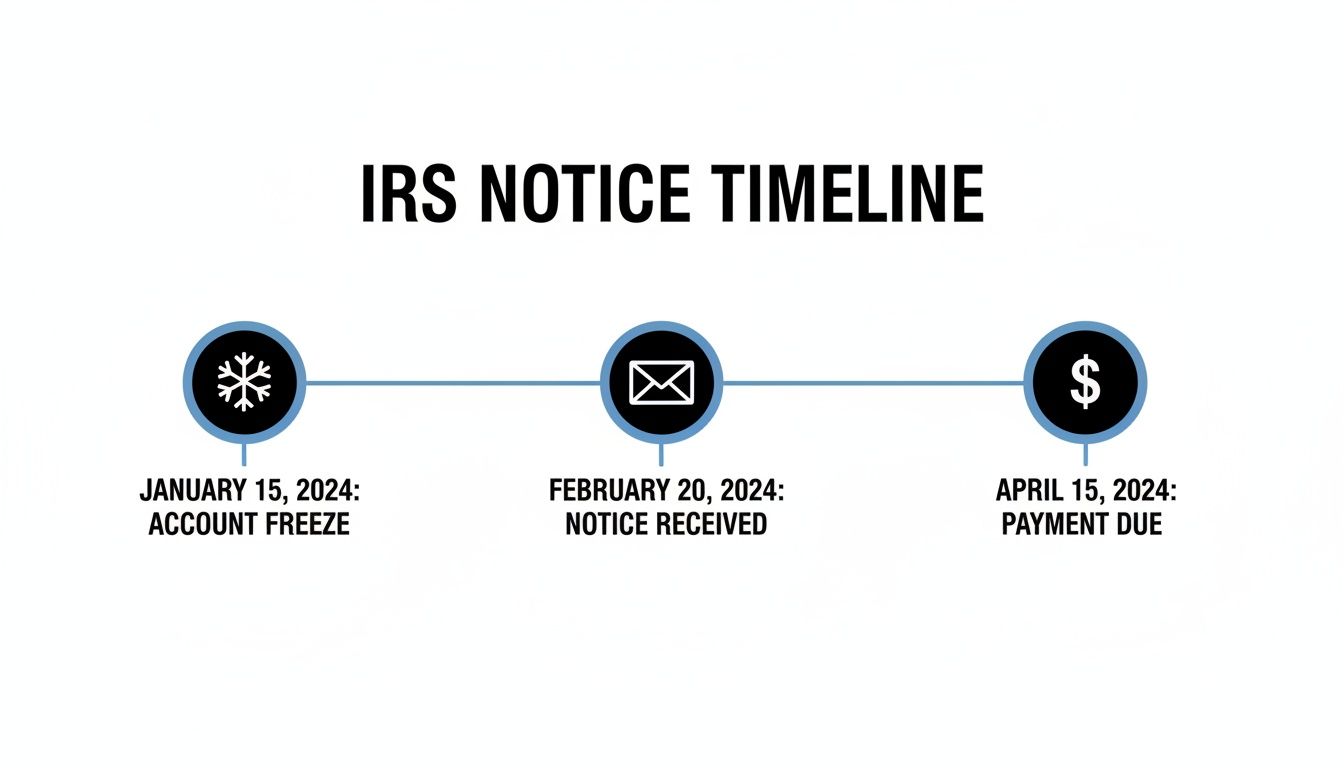
As you can see, an account freeze is often the first sign of trouble, showing up on your transcript before you ever get a notice in the mail. It's your heads-up to start watching for that envelope.
Making Sense of the Balance Section
The summary at the top of the transcript lays out your account balance, but the numbers can feel a little backward if you're not used to them.
Here's the simple breakdown:
- A positive balance ($) means you owe the IRS. Think of it as a debit on your account.
- A negative balance (-$) means you have a credit. This usually leads to a refund.
For instance, an "ACCOUNT BALANCE" of $2,500.00 means you have a tax debt for that amount. But if it shows -$1,200.00, you're owed a $1,200 refund (as long as there are no other issues or holds on your account).
While an IRS transcript is a very specific document, the skills you use to read it are valuable elsewhere. The core principles of tracking debits, credits, and timelines are fundamental to understanding how to read various financial statements in general.
This knowledge becomes especially critical when you're up against the Collection Statute Expiration Date (CSED). That's the 10-year clock the IRS has to collect a tax debt from you. Certain events on your transcript can pause or even extend that deadline. You can learn more about the IRS collection statute expiration date to see how this crucial timeline works.
By carefully following the sequence of dates and matching them to the balances, you can confirm your payments were applied correctly, pinpoint the exact day a penalty was added, and make sure every credit was posted properly. This turns a confusing list of codes and numbers into a clear, actionable financial record.
Walking Through Real-World Transcript Scenarios
Theory is one thing, but seeing how these codes play out on an actual transcript is where it all clicks. The best way to learn is by looking at real-life situations. This is how you start connecting the dots between transaction codes, dates, and balances to see the full story of your tax account.
Let's walk through a few common scenarios, line by line. I'll show you how to take a confusing jumble of numbers and turn it into a clear narrative with an obvious next step.

Scenario 1: A Held Refund Due to an ID Verification Flag
Let’s imagine a taxpayer, Jane. She filed early, expecting a nice refund. But weeks have passed, and there's been radio silence. She pulls her account transcript and a few key entries immediately tell her what’s going on.
Here’s a snapshot of what she might see:
- 150 Tax return filed: $2,500.00
- 806 W-2 withholding: -$4,000.00
- 570 Additional account action pending: $0.00 (Dated two weeks after filing)
- 971 Notice issued: $0.00 (Dated a few days after the Code 570)
That Code 570 is the immediate red flag. Think of it as the IRS hitting the pause button on her account, effectively freezing her refund. The Code 971 right after it confirms a letter is in the mail explaining why.
This is an incredibly common situation. The IRS flags millions of returns for potential fraud, and in the 2024 filing season alone, it suspended over 1.9 million returns for identity verification. Jane’s transcript is a textbook example. The notice she gets will almost certainly be a Letter 5071C, which will instruct her to verify her identity online or by phone. Once she does that, the hold will be released.
Scenario 2: A Small Business with Late Payment Penalties
Next up is Mark, a small business owner. He filed his S Corp return on time but couldn't cover the full tax bill. He sent a partial payment, intending to catch up later. His transcript paints a clear picture of how penalties and interest start to pile up.
A simplified version of his transcript might look like this:
| Transaction Code | Description | Amount |
|---|---|---|
| 150 | Tax Return Filed | $10,000.00 |
| 610 | Payment with Return | -$4,000.00 |
| 176 | Failure to Pay Penalty | $30.00 |
| 246 | Interest Assessed | $25.00 |
| 670 | Subsequent Payment | -$2,000.00 |
Let's break it down. Mark’s tax liability was $10,000 (Code 150), but he only paid $4,000 when he filed (Code 610). Because he left a balance, the IRS system automatically tacked on a Failure to Pay Penalty (Code 176) and interest (Code 246).
His later $2,000 payment (Code 670) helps, but it doesn't stop the clock. Penalties and interest will continue to grow on whatever balance is left until it's completely zeroed out.
Expert Insight: I see this all the time. People think paying off the original tax is enough, but they forget about the penalties and interest. These are separate line items, and you have to account for them to truly clear your debt.
Scenario 3: An Unexpected Refund Offset
Finally, let's look at Sarah. She was looking forward to a refund, but instead got a notice saying it was used to pay off an old debt. This is a refund offset, and your transcript will show you exactly how it happened.
Her transcript would tell the story with just a few lines:
- 150 Tax return filed: $1,500.00
- 806 W-2 withholding: -$2,500.00
- 846 Refund issued: -$1,000.00 (This is the refund she should have received)
- 826 Overpayment transferred to prior year tax debt: $1,000.00
See what happened there? The Code 846 shows her refund was approved and ready to go. But the very next entry, Code 826, acts like a clawback, redirecting that money to cover a debt from a previous tax year.
This is a perfect example of why the transcript is so valuable—it shows you not just what was supposed to happen, but what actually did. If you're dealing with ongoing debt, there are programs that can help. It's worth learning more about the options available through the IRS Fresh Start Program.
So, What's Next? Turning Transcript Insights Into Action
Once you've decoded the codes and timelines, you’re no longer just staring at a government form—you’re reading the real story of your tax account. Now it’s time to use that knowledge. The first thing to do is make sure you don't fall into a few common traps that trip up even savvy taxpayers.
One of the biggest mistakes I see is treating the "as of" date like a final bill. It’s not. Think of it as a snapshot in time, showing the interest and penalties calculated up to that specific day. If you owe money and mail a check for that amount a month later, it's going to be short because more interest will have piled up in the meantime.
Another classic error is ignoring a pending action code. Seeing a Code 570 ("Additional Account Action Pending") and just waiting it out is a recipe for a massive delay. That code is your transcript’s version of a flashing red light, signaling a hold on your refund that absolutely will not resolve itself.
Deciding Your Next Move
Your account transcript is essentially a diagnosis. Now that you've pinpointed the problem, you can figure out the right treatment. Most situations fall into one of three buckets.
- You Owe Money: The balance is a positive number, and you're seeing codes for penalties (176) or interest (246).
- You Found an Error: You've spotted something that's just plain wrong—a payment that wasn't credited or a penalty you believe was applied by mistake.
- You Have a Refund Hold: Your transcript is showing a Code 570 or another freeze code, and your refund is stuck in IRS limbo.
Each of these scenarios requires a different game plan. The key is to be proactive and tackle the problem head-on, using the details from your transcript as your road map.
What to Do When You Owe the IRS
If your transcript confirms you have a balance due, don’t panic. The IRS actually has several flexible ways to handle tax debt. Your best first step is to visit the IRS website and explore their payment options.
For many people, setting up a payment plan can be done online in just a few minutes, especially if you owe less than $50,000. The most critical thing is to act fast. Doing nothing just allows more penalties and interest to snowball.
How to Dispute an Error on Your Transcript
What if you see something that just doesn't add up? Maybe a payment you mailed never got posted, or a credit disappeared without explanation. This is where your transcript becomes your most powerful tool.
The first step is to call the IRS. When you get an agent on the line, you need to be specific. Refer to the exact transaction codes and dates from your transcript. Instead of a vague complaint like, "My payment is missing," you can say, "My transcript shows no Code 670 for the $1,500 payment I mailed on June 10th." This evidence-based approach gets much better results.
A Pro Tip From Experience: Always, always document your calls. Jot down the date, the agent's name or ID number, and a quick summary of what you discussed. This creates a paper trail that can be a lifesaver if the issue isn't fixed on the first try.
When to Stop Guessing and Call a Professional
You can handle a lot of these issues on your own, but some codes are serious red flags. They aren’t just about minor processing hiccups; they signal major compliance actions that can have severe and lasting financial consequences. When you see these, it’s time to bring in an expert.
Here are the codes that should make you pick up the phone and consult a tax attorney:
- Code 420 or 424 (Examination/Audit): This is it—the official start of an IRS audit. Successfully navigating an audit requires a deep understanding of tax law and a solid strategy.
- Code 582 (Federal Tax Lien): This is a big deal. It means the IRS has filed a public lien against your property, which can torch your credit and make it nearly impossible to get a loan.
- Code 290 (Additional Tax Assessed): Be extra wary of this one, especially if it appears with a big dollar amount and a "0.00" balance. It can signal a proposed assessment like the Trust Fund Recovery Penalty, which is a very serious matter.
Trying to tackle these situations by yourself is incredibly risky. An experienced tax professional can see the full picture, represent you before the IRS, and fight for the best possible outcome. They know the procedural rules and taxpayer rights that can protect you from further damage.
Answering Your Top Questions About IRS Transcripts
Once you get the hang of the codes and dates, you start to notice the little details that can still be confusing. Let's tackle some of the most common questions that pop up when people are figuring out how to read an IRS account transcript.
How Often Does My Transcript Actually Update?
One of the biggest misconceptions is that your transcript is a live document. It's not. The IRS master file, the central database for all taxpayer accounts, usually only updates once a week. For most people, this happens on a Thursday night.
So, if you make a payment on a Monday, don't be surprised if you don't see it show up until the following weekend. The "cycle date" next to each transaction code tells you precisely when the IRS processed that entry. A little patience goes a long way here; check back weekly for the latest info.
My Transcript Says My Refund Was Issued, but My Bank Account Is Empty. What Gives?
Seeing Code 846 (Refund Issued) is a great sign, but it doesn't mean the money is instantly in your hands. The date listed next to Code 846 is when the IRS sent the money out, not when you'll actually get it.
Here's what could be causing the delay:
- Direct Deposit: It can still take 1-5 business days for the deposit to post to your account after the IRS issue date.
- Paper Check: If you're getting a check in the mail, you're at the mercy of the postal service. It can easily take a few weeks to arrive.
- Bank Rejection: A simple typo in your account or routing number will cause the bank to reject the deposit. When this happens, the IRS will default to mailing a paper check, which adds a significant delay.
Will a Transcript Tell Me if I'm Being Audited?
Yes, and it's often the very first sign you'll get. If you see Code 420 (Examination of Tax Return) on your transcript, it's a clear confirmation that your return has been flagged for an audit.
You can expect an official notice from the IRS to arrive in the mail soon after that code appears, explaining what they're looking into.
Expert Tip: Think of your transcript as an early warning system. The official letter is coming, but the codes on your transcript give you a valuable head start to gather your documents and figure out your strategy. Don't ignore them.
Why Does the IRS Website Say My Transcript Is Unavailable?
Don't panic if you get a "not available" message when trying to view your transcript online. This is actually pretty common and usually boils down to a few simple reasons:
- You're a first-time filer.
- You just filed recently, and your return is still working its way through the system.
- Your account has been flagged for a potential identity theft issue, and the IRS is being cautious.
If you e-filed more than three weeks ago (or mailed your return more than six weeks ago) and you still can't access it, that's a good time to give the IRS a call to see what's going on.
When your transcript shows serious issues like audits, liens, or levies, you're beyond simple questions. Navigating that requires real expertise. I'm Attorney Stephen A Weisberg, and I can help you find a clear path forward. I don't use high-pressure sales calls; instead, I offer a FREE Tax Debt Analysis to show you exactly how I can help. Get the professional guidance you need at https://weisberg.tax.